


Arduino Sensors Guide: 10 Sensors Every Robotics Beginner Should Know

Introduction
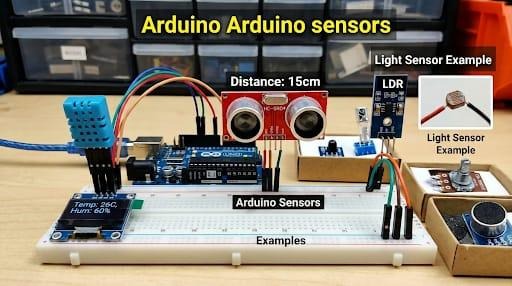
Sensors help Arduino-based robots detect their surroundings and respond to changes. They can measure distance, light, temperature, motion, sound, and more. This guide introduces ten common sensors and explains their main uses in beginner robotics projects.

What Is an Arduino Sensor?
A sensor detects a physical condition and converts it into a signal an Arduino can read. Sensor outputs may be analog, digital, or data sent through interfaces such as I²C, SPI, or UART.
Explore beginner-friendly components in the IBOTS 37-in-1 Sensor Kit.
10 Arduino Sensors for Beginners
1. Ultrasonic Sensor (HC-SR04)
Measures distance by sending ultrasonic pulses and timing their echoes.
Applications: Obstacle-avoiding robots, distance measurement, parking models.
Project: Build a robot that turns when an obstacle is detected.
2. Infrared (IR) Sensor
Detects reflected infrared light from nearby surfaces. Results can vary with surface color and ambient light.
Applications: Object detection, edge detection, simple counting.
Project: Use IR sensors to detect an edge or nearby object.
3. Temperature Sensor (LM35)
Produces an analog voltage related to temperature. The Arduino reads the voltage and converts it to a temperature estimate.
Applications: Temperature monitoring, fan control, environmental projects.
Project: Switch on a fan when temperature crosses a set threshold.
4. PIR Motion Sensor (HC-SR501)
Detects changes in infrared energy, often caused by moving people or animals. It does not measure distance.
Applications: Motion-activated lights, alarms, presence-triggered systems.
Project: Trigger a buzzer when motion is detected.
5. Light Sensor (LDR)
Changes resistance according to the light falling on it. A voltage-divider circuit lets the Arduino read the change.
Applications: Automatic lights, light-following robots, brightness detection.
Project: Use two LDRs to guide a robot toward brighter light.

6. Line Tracking Sensor
Often uses infrared light to distinguish a line from the surrounding surface.
Applications: Line-following robots, path tracking, robotics competitions.
Project: Make a robot follow a dark line on a light track.
7. Accelerometer and Gyroscope (MPU-6050)
Measures acceleration and rotational movement; software can combine readings to estimate orientation.
Applications: Tilt detection, motion tracking, self-balancing experiments.
Project: Build a tilt-controlled robot.
8. Gas Sensor (MQ-2)
Responds to certain gases and smoke-related changes. It requires appropriate warm-up and calibration.
Applications: Educational gas-sensing demonstrations and experiments.
Project: Trigger an indicator when readings pass a test threshold. This is not a replacement for a certified safety detector.
9. Sound Sensor Module
Uses a microphone and circuit to detect sound levels or changes in acoustic activity.
Applications: Clap-triggered devices, sound-reactive robots, noise demonstrations.
Project: Turn on an indicator when a loud sound is detected. A basic module does not understand speech commands.
10. Touch Sensor (TTP223)
Detects a touch or nearby finger through a change in capacitance and provides a digital output.
Applications: Touch controls, interactive devices, human-machine interfaces.
Project: Start or stop a small robot using a touch pad.
Quick Comparison
| Sensor | Detects | Common project |
| HC-SR04 | Distance | Obstacle avoidance |
| IR sensor | Reflected IR light | Object detection |
| LM35 | Temperature | Fan control |
| PIR | Motion | Motion alert |
| LDR | Light | Light-following robot |
| Line tracking | Surface contrast | Line follower |
| MPU-6050 | Acceleration/rotation | Tilt or balance |
| MQ-2 | Certain gases/smoke-related changes | Gas-sensing demo |
| Sound sensor | Sound activity | Clap trigger |
| TTP223 | Touch | Touch control |
How to Choose the Right Sensor
- Obstacle avoidance: HC-SR04 or a suitable distance sensor.
- Line following: IR line-tracking module.
- Light detection: LDR with a voltage-divider circuit.
- Motion detection: PIR sensor.
- Tilt or balancing experiments: MPU-6050 or another suitable inertial sensor.
- Temperature monitoring: LM35 or a compatible temperature sensor.
- Touch or sound interaction: TTP223 or a microphone-based sound module.
Basic Connection Tips
- Check the sensor pinout, operating voltage, and output specifications before wiring.
- Connect power and ground correctly; many modules need a common ground with the Arduino.
- Use the correct analog, digital, I²C, SPI, or UART interface.
- Test one sensor at a time before adding motors or other components.
- Use a suitable motor driver; do not power motors directly from Arduino GPIO pins.
Beginner Projects
- Obstacle-avoiding robot: use an ultrasonic sensor and motor driver.
- Line-following robot: use two or more line sensors to stay on a track.
- Light-following robot: compare readings from two LDRs.
- Motion alert: connect a PIR sensor to a buzzer or indicator.
- Tilt-controlled robot: use an inertial sensor to detect controller movement.
For hands-on sensor and automation experiments, explore the IBOTS Internet of Things Kit.
Conclusion
Sensors help Arduino robots detect and respond to their surroundings. Start with one sensor, test its readings, and then combine it with other components as your project develops.
Learn through practical projects at IBOTS Academy, explore components at IBOTS, or get technical assistance through Techring.ai.
FAQs
Which Arduino sensor is best for beginners?
The HC-SR04 ultrasonic sensor and basic IR modules are common starting points.
Can I connect multiple sensors to one Arduino?
Yes, if the board has enough pins and the power, interface, and resource requirements are met.
Do sensors need programming?
Usually. The code reads the sensor signal and determines how the project responds.
Can these sensors work with Arduino Uno?
Many can, but always check voltage, wiring, interface, and power compatibility.
Which sensors are used for an obstacle-avoiding robot?
A suitable distance sensor, Arduino, motor driver, motors, and compatible power source are common components.